

In India, a significant portion of online shoppers access e-commerce platforms via low-bandwidth networks or feature phones. Slow connections, limited screen sizes, and older browsers can create friction during checkout, resulting in abandoned carts and lost revenue. Optimising forms for accessibility is no longer optional; it is essential for inclusive, high-converting experiences.
This blog, Checkout accessibility: optimising forms for low bandwidth and feature phones, explores practical strategies for designing checkout flows that work seamlessly across constraints. From minimalistic form design to progressive data loading and device-aware optimisation, we examine operational approaches that reduce friction, improve completion rates, and maintain brand trust.
The focus is on actionable, data-driven insights that D2C ops, marketing, and product teams can implement immediately, turning technical limitations into opportunities for higher engagement and smoother customer journeys.
Why low-bandwidth and feature phone users face checkout friction
Understanding the technical and behavioural constraints at play
Many checkout failures are not due to product interest but technical limitations. Slow networks, limited memory, and small screens on feature phones prevent pages from loading quickly, causing customers to abandon carts. Even lightweight forms can become unusable if they are not designed for these environments.
Key constraints to consider
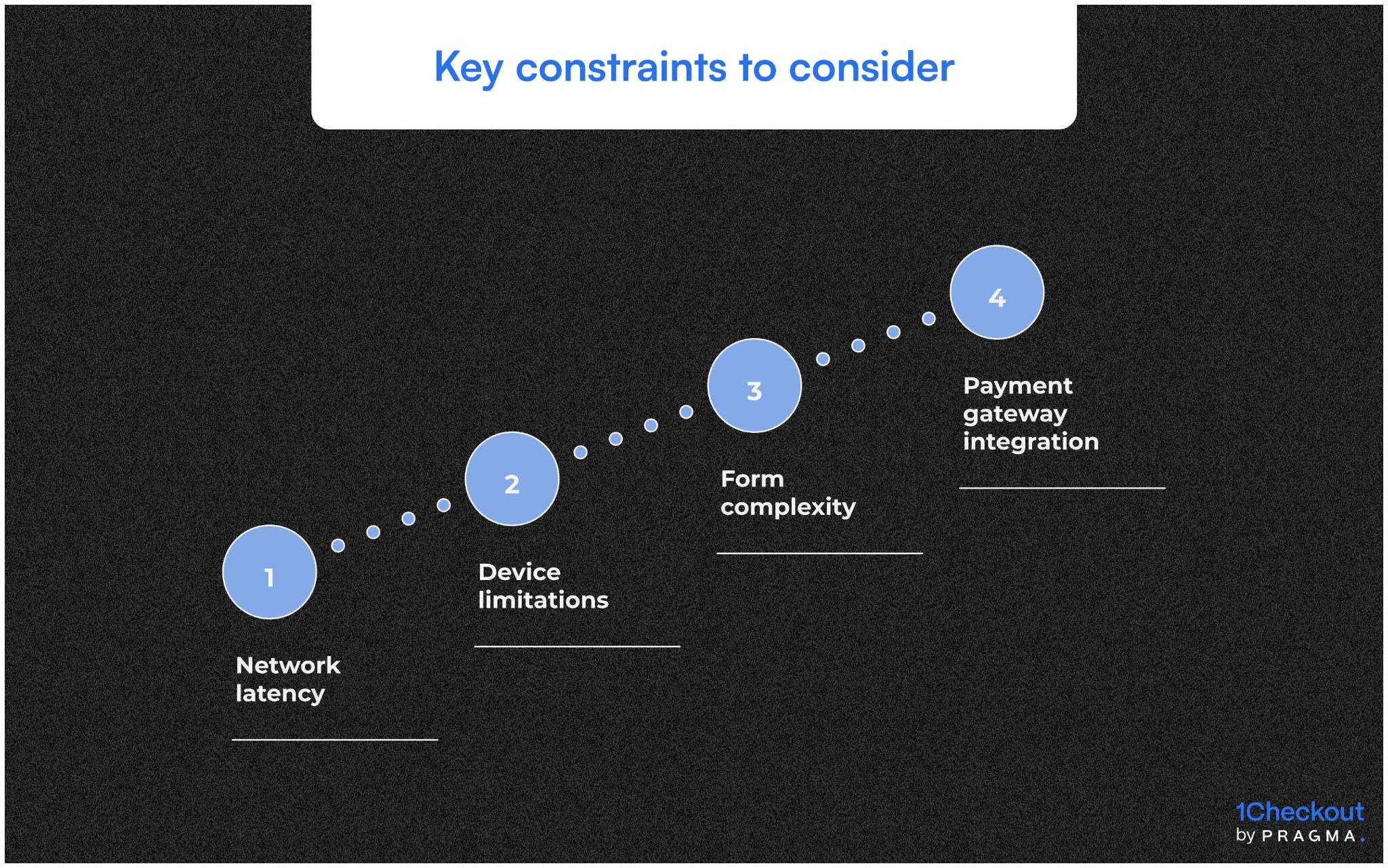
- Network latency: Pages with heavy images or scripts take longer to load on 2G/3G networks.
- Device limitations: Feature phones have smaller screens, no touch input, and basic browsers.
- Form complexity: Multi-step forms with many fields increase cognitive load and error rates.
- Payment gateway integration: Some gateways may not render correctly on older browsers.
Operational impact
- Higher cart abandonment rates
- Increased customer complaints and support tickets
- Lost revenue, particularly in tier-2 and tier-3 markets
How minimalistic form design improves accessibility
Reducing cognitive load and improving input success
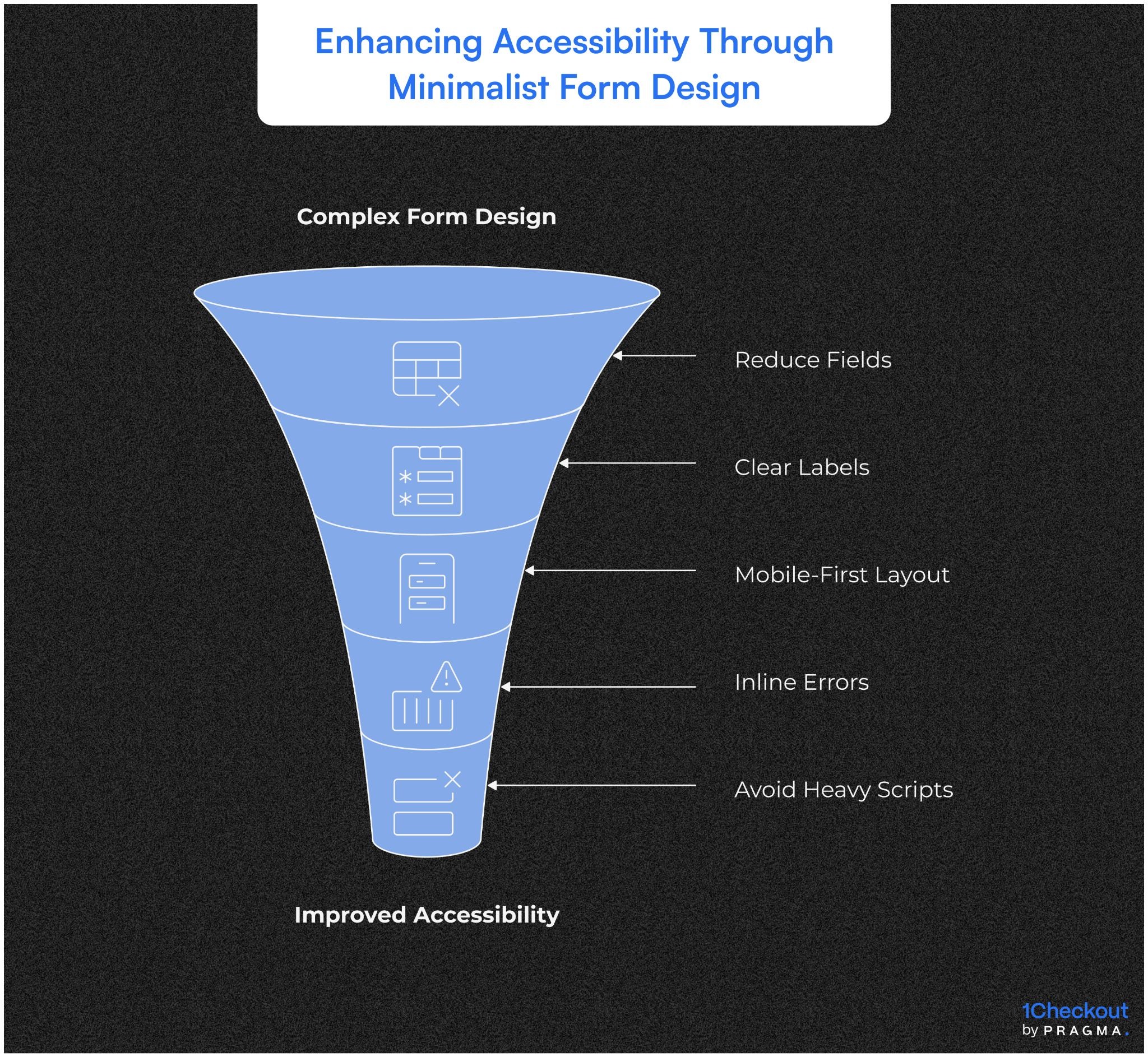
Simplifying forms is critical. A well-designed form reduces the number of fields, uses clear labels, and avoids unnecessary graphics that slow down loading. Mobile-first, feature-phone-friendly layouts ensure that essential information is captured efficiently.
Design principles for low-bandwidth checkouts
- Limit the number of required fields to essentials only.
- Use single-column layouts with large, legible fonts.
- Provide inline error messages to prevent form resubmissions.
- Avoid heavy scripts and unnecessary images.
Practical outcomes
- Faster form completion
- Fewer input errors
- Higher conversion rates for low-bandwidth users
How progressive data loading can accelerate checkout
Load forms and payment options in stages for faster performance
Instead of loading all form elements and scripts at once, progressive or asynchronous loading ensures critical elements appear first. This approach significantly improves perceived speed and reduces drop-offs.
Implementation strategies
- Load personal and shipping details first, followed by optional fields.
- Defer loading payment scripts until the customer reaches the payment step.
- Preload form templates in the background while the user fills initial data.
Benefits
- Faster visible load time
- Reduced abandonment on slower networks
- Seamless experience even on feature phones
Why device-aware optimisation matters
Tailoring form experience based on the user’s device
Not all devices render pages the same. Detecting device type and browser capabilities allows teams to serve an optimised version of the checkout form.
Operational tactics
- Use responsive design for smartphones and simplified HTML for feature phones.
- Provide fallback text instead of images or complex widgets.
- Detect and redirect unsupported browsers to a basic version of the form.
Outcome
- Consistent user experience across devices
- Reduced frustration and drop-offs
- Better engagement metrics across tier-2/3 markets
Payment accessibility and fallback options
Ensuring all users can complete transactions regardless of device
Payment failures are a major cause of checkout drop-offs on low-bandwidth and feature phones. Limited browser support and slow network connections can make certain payment gateways unusable. A structured fallback strategy ensures no customer is left stranded.
Key strategies for payment accessibility
- Offer multiple payment options including UPI, wallets, and COD.
- Provide lightweight, mobile-friendly payment forms for low-end devices.
- Implement auto-retry and error detection to prevent failed transactions.
- Show clear instructions and confirmation messages in the customer’s preferred language.
Operational outcome
- Reduced payment failures and abandoned carts
- Improved revenue capture across all regions
- Fewer support tickets related to failed payments
Analytics-driven optimisation
Using performance metrics to refine checkout forms
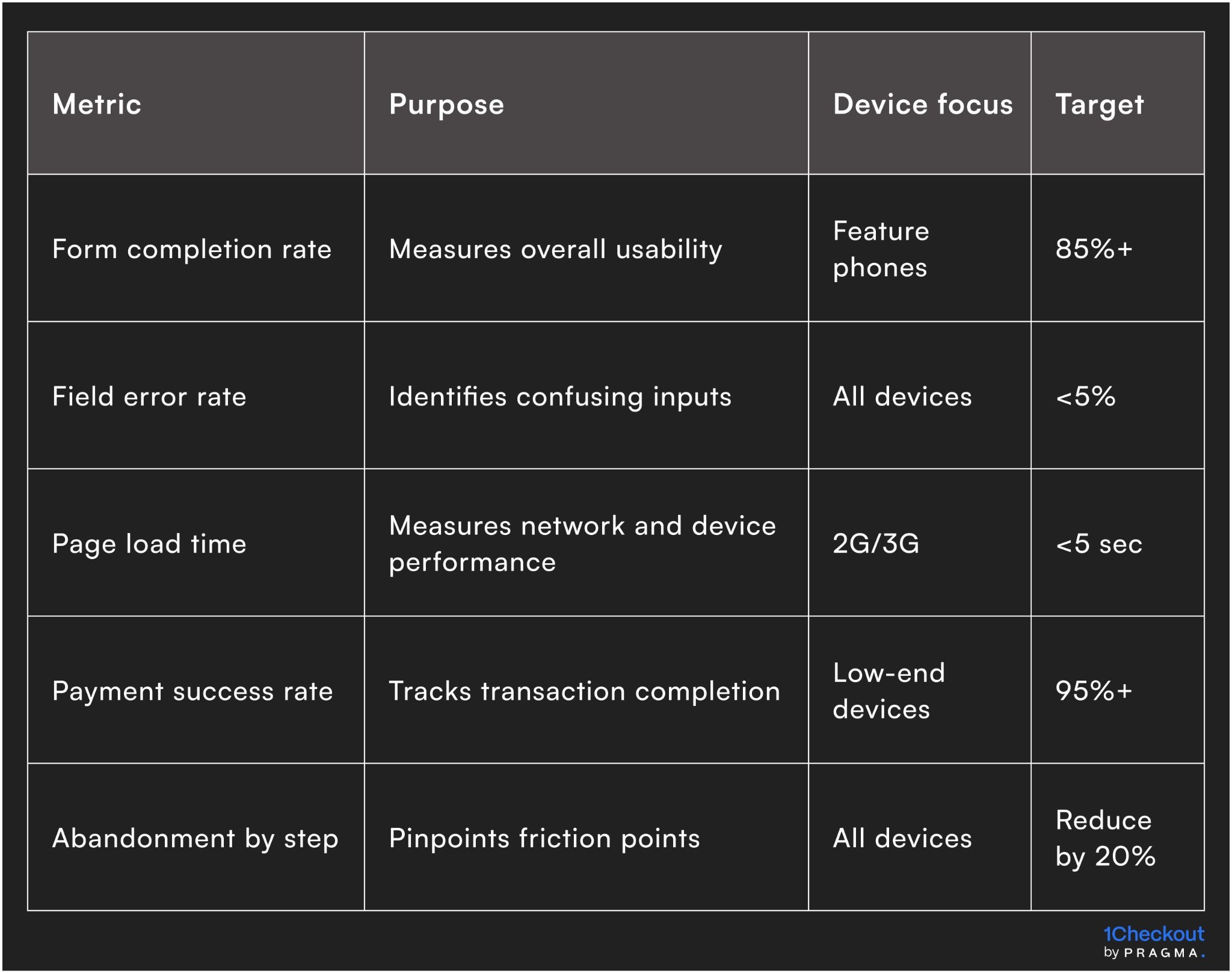
Data is critical to identify where low-bandwidth users struggle. Tracking specific metrics helps teams prioritise interventions and improve operational efficiency.
Metrics to monitor
Insights
- Identifies bottlenecks for optimisation
- Guides improvements in form design and payment flows
- Supports continuous operational refinement
SOPs for testing and scaling low-bandwidth forms
Standardised processes to ensure consistent delivery and quality
To scale accessible checkout forms, teams need clear SOPs covering design, testing, and deployment. Standardised processes prevent errors, reduce rework, and maintain performance consistency.
SOP components
- Device and network simulation testing
- Multi-language content verification for field labels and messages
- Approval workflow for template updates
- Version control to avoid deploying outdated forms
- Feedback capture loop from CX and ops teams
Outcome
- Reliable, repeatable process for form updates
- Faster deployment of new campaigns
- Lower operational risk and fewer customer complaints
How iterative A/B testing improves conversions
Continuous learning from low-bandwidth user behaviour
A/B testing helps identify which layout, field order, or messaging works best for feature phone and low-bandwidth users. Iterative testing ensures measurable improvements over time.
Key operational steps
- Segment users by device type and network speed
- Test simplified layouts, shorter forms, and reduced images
- Measure completion rate, payment success, and error frequency
- Apply successful variations across all campaigns
Benefits
- Data-driven improvements in checkout performance
- Reduced friction for high-risk segments
- Operational teams can quickly scale best practices
Scaling accessible checkout across campaigns
Managing high volume without losing performance
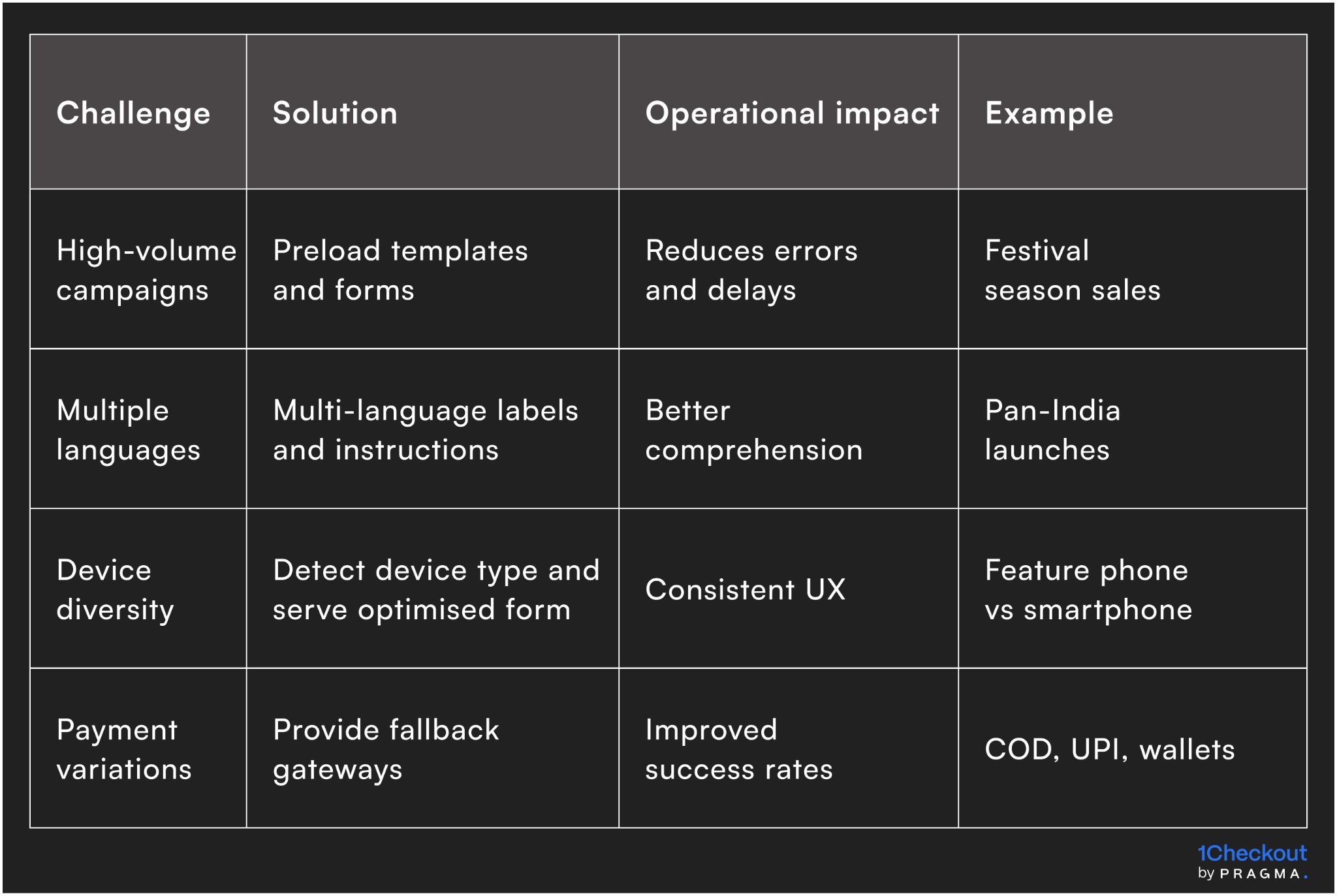
Once optimised, low-bandwidth-friendly forms should be deployed across marketing campaigns, app updates, and notifications. Automation, monitoring, and workflow integration ensure that these forms remain effective at scale.
Scaling tactics
Quick Wins
Practical actions to make checkout accessible for all users
Week 1: Identify low-bandwidth and feature phone users
Segment customers using network speed, device type, or order history. Start with the highest-volume segments.
Expected outcome: Targeted improvements for the most at-risk users.
Week 2: Simplify checkout forms
Reduce fields to essentials, implement single-column layouts, and remove heavy scripts or images. Test on low-end devices.
Expected outcome: Faster load times and fewer form errors.
Week 3: Optimise payment flows
Add multiple payment options, lightweight gateways, and fallback options for failed transactions. Include clear instructions in regional languages.
Expected outcome: Higher payment success and lower cart abandonment.
Week 4: Monitor and iterate
Track metrics like form completion rate, payment success, and abandonment by step. Apply insights to refine form design and template content.
Expected outcome: Continuous improvement and higher conversion rates.
To Wrap It Up
Optimising checkout for low-bandwidth and feature phone users is critical for pan-India conversions. Small changes in form design, payment accessibility, and device-aware rendering can drastically reduce drop-offs.
This week, start by segmenting users by device and network speed, and simplify your checkout forms for those most at risk.
Long-term, combine SOPs, progressive loading, multi-payment options, and iterative testing to ensure accessibility scales across campaigns, devices, and regions.
For D2C brands seeking inclusive checkout experiences, Pragma's CX optimisation platform provides device detection, progressive forms, and analytics capabilities that help brands increase checkout completion rates by up to 20% while reducing friction for low-bandwidth users.
.gif)
FAQs (Frequently Asked Questions On Checkout accessibility: optimising forms for low bandwidth and feature phones)
1. Why is checkout optimisation important for feature phone users?
Slow networks and limited device capabilities increase abandonment; optimised forms reduce friction and improve conversions.
2. How do minimalistic forms help low-bandwidth users?
Fewer fields and lightweight designs load faster and reduce input errors, enhancing completion rates.
3. Which payment options work best for feature phones?
UPI, wallets, and COD, combined with lightweight gateways, ensure transactions succeed even on older devices.
4. How should form performance be measured?
Metrics include form completion rate, field error rate, payment success rate, and step-by-step abandonment.
5. Can progressive data loading improve checkout experience?
Yes. Loading critical fields first and deferring optional content reduces perceived load time and drop-offs.
6. Are SOPs necessary for low-bandwidth checkouts?
Absolutely. SOPs ensure consistent testing, updates, and deployment across campaigns.
7. How often should checkout forms be updated or tested?
Regular reviews, iterative A/B testing, and monitoring of feedback ensure forms remain optimised for all users.



.svg)
.svg)