

In D2C logistics, the way customers enter their delivery address can make a significant difference in operational efficiency, delivery success, and RTO rates. With rising volumes and increasingly complex fulfilment networks, brands face a key decision: should they rely on address autocompletion tools or allow manual entry? The choice affects every downstream process, from order validation and warehouse sorting to carrier routing and last-mile delivery.
This blog, Address autocompletion vs manual entry: performance by region and channel, explores how different address entry methods perform across urban, semi-urban, and rural areas, as well as across web, mobile app, and call center channels.
It examines where autocompletion drives efficiency, where manual entry remains necessary, and how teams can combine both approaches without creating operational bottlenecks.
Why address accuracy matters for delivery performance
Errors in address entry ripple across logistics operations
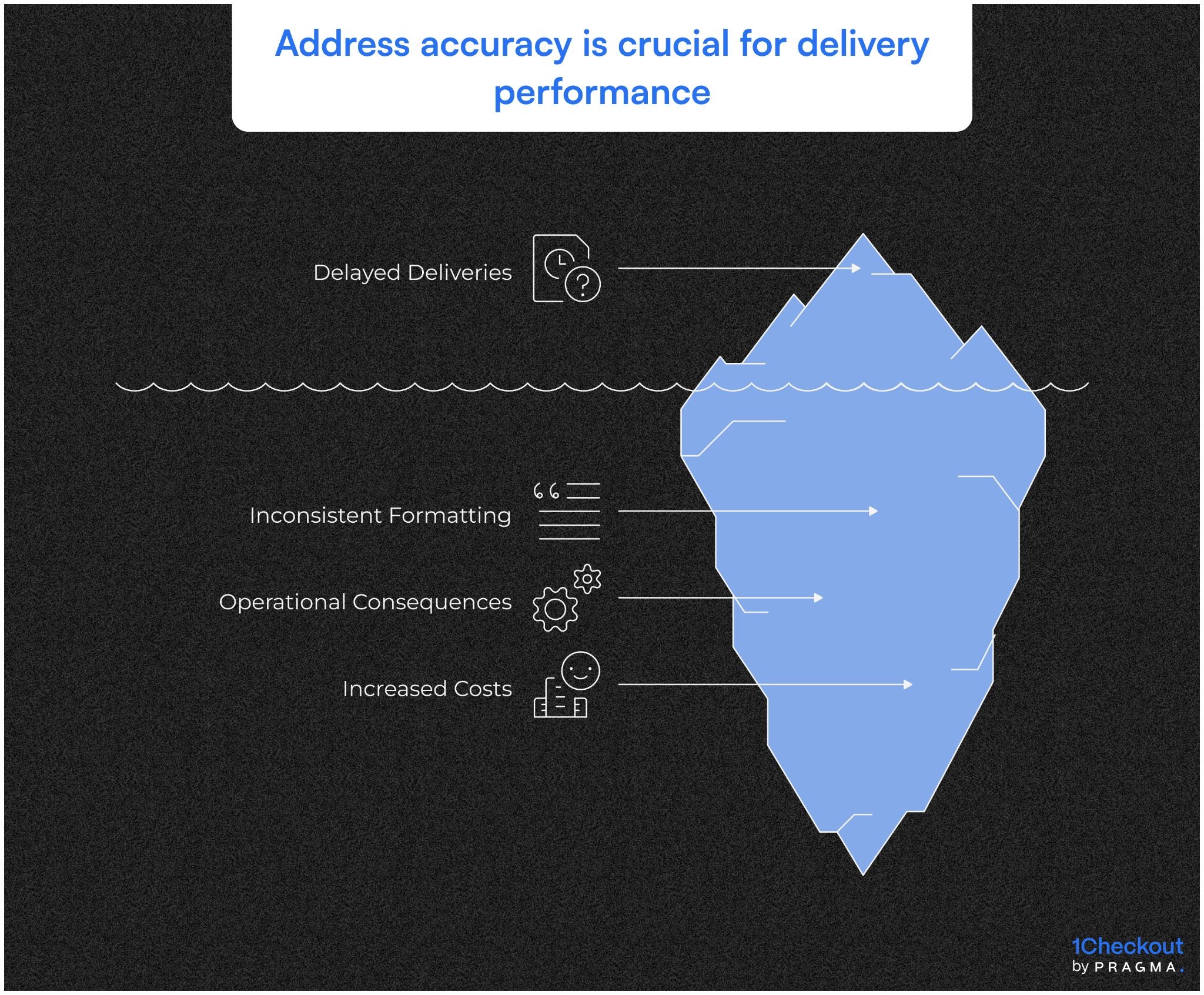
Impact of incorrect or incomplete addresses
Even minor mistakes — missing landmarks, incorrect pin codes, or swapped street numbers — can cause delayed deliveries, multiple carrier attempts, and higher RTO rates. \
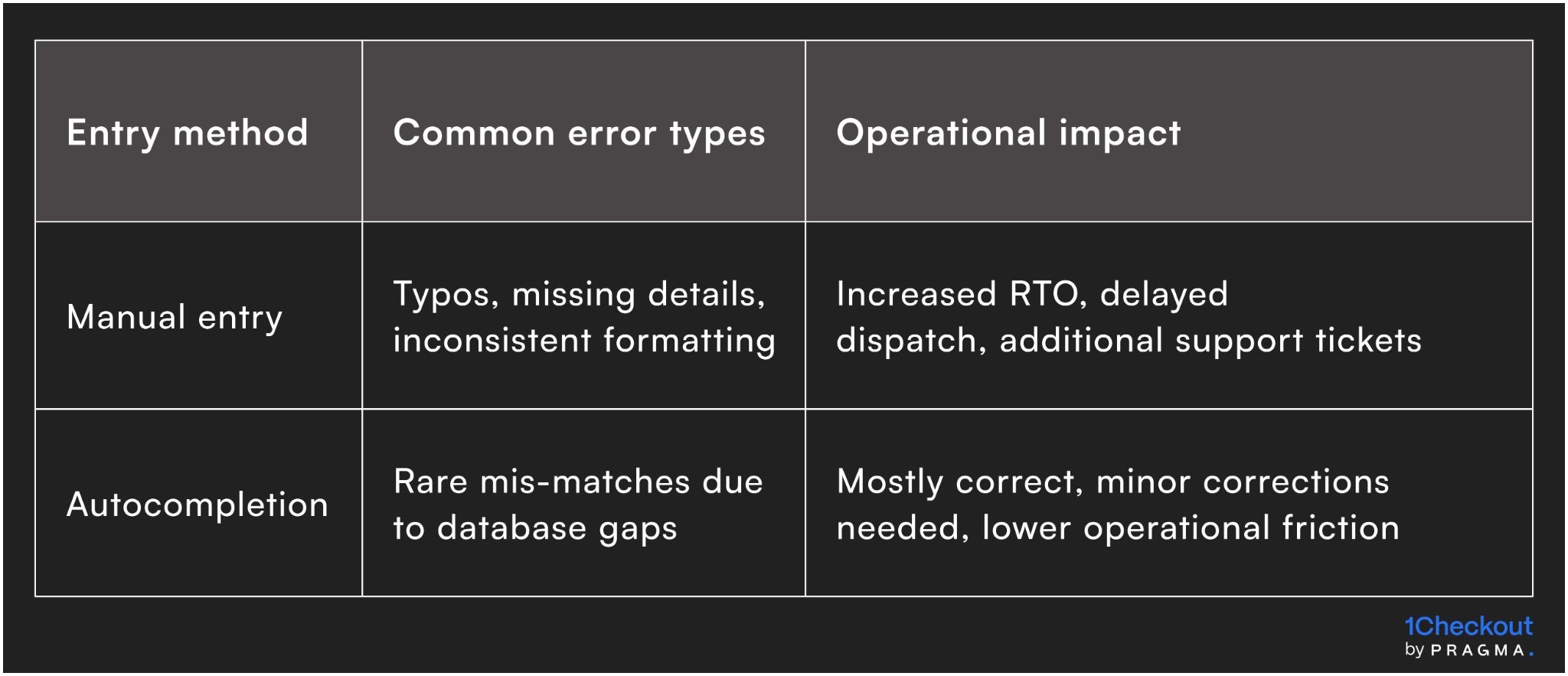
Manual entry often leads to inconsistent formatting, while autocompletion reduces common errors by standardising address components.
Operational consequences
Incorrect addresses affect warehouse sorting, carrier routing, and last-mile delivery. For example, a misformatted pin code may result in the package being sent to a wrong hub, while missing apartment numbers can delay handoffs for urban multi-unit buildings.
Over time, these errors not only increase operational costs but also reduce customer trust and satisfaction.
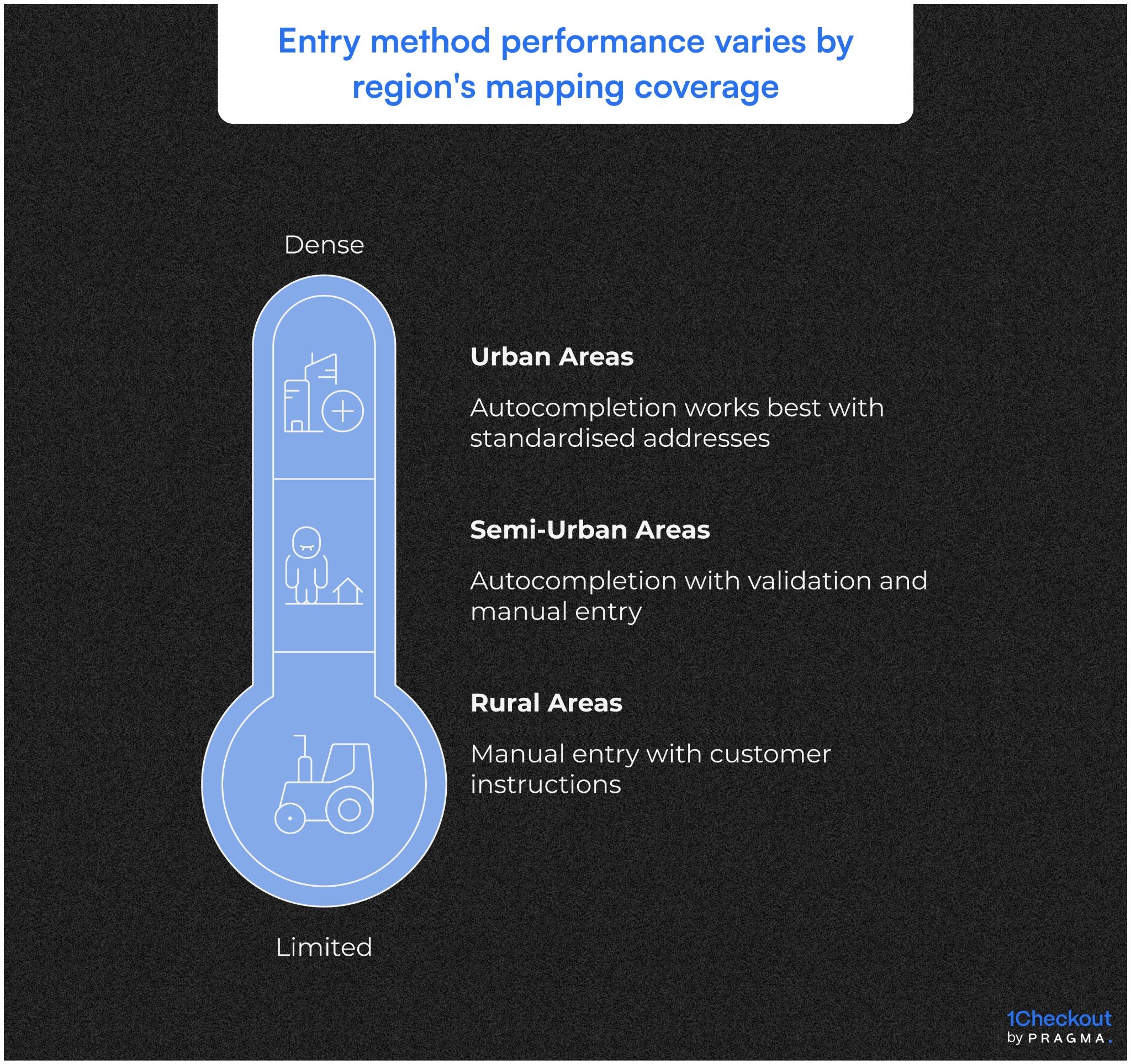
How region affects entry method performance
Urban, semi-urban, and rural areas show distinct patterns
Urban areas
Autocompletion works best in dense, mapped regions. Delivery teams benefit from standardised addresses with pin codes and apartment numbers, reducing manual interventions and improving first-attempt success rates.
Semi-urban areas
Coverage gaps in mapping databases can lead to partial matches. Autocompletion still reduces typos but may require additional validation steps. Manual entry is often used for local nuances, such as village names or less formal landmarks.
Rural areas
Autocompletion coverage is limited. Manual entry remains necessary, often supplemented with customer instructions to clarify location. While slower, careful manual entry ensures packages reach remote addresses with minimal RTO.
Channel-specific performance of address entry
Web, app, and call center channels present unique operational challenges
Web and mobile app
Autocompletion can be integrated seamlessly with form validation and prompts, improving accuracy and reducing user effort. Manual entry on web forms is prone to errors, particularly when customers skip optional fields or use unconventional formats.
Call center and offline channels
Operators often rely on manual entry or voice-assisted autocompletion. Errors can arise from misheard addresses, inconsistent formatting, or incorrect transcription. Training and standardised templates help reduce mistakes, but human input still introduces variability.
How autocompletion improves operational efficiency
Reducing errors and manual interventions through standardised addresses
Benefits of autocompletion for logistics teams
Autocompletion reduces typos, enforces standard formatting, and ensures essential fields like pin codes and apartment numbers are captured consistently.
Faster warehouse sorting
Correctly formatted addresses allow sorting systems to process orders more efficiently, reducing manual interventions and errors.
Improved carrier routing
Standardised addresses reduce misrouted packages, lowering RTO rates and improving first-attempt delivery success.
Lower support workload
Fewer address-related errors mean customer support teams spend less time clarifying details, freeing them for other operational tasks.
When manual entry is still necessary
Certain regions and situations require human input to ensure delivery success
Rural and unmapped areas
Autocompletion may not recognise local villages or newly developed areas. Manual entry allows operators or customers to provide specific instructions.
Incorporating landmarks
Customers or operators can include nearby landmarks, which are critical for last-mile delivery in rural regions.
Handling unusual formats
Manual entry allows non-standard addresses to be captured accurately, ensuring that packages reach hard-to-map locations.
Edge cases in urban zones
Even in cities, autocompletion can occasionally produce incorrect matches, particularly for multi-unit buildings or newly registered streets.
Cross-verification protocols
Logistics teams can flag unmatched or ambiguous addresses for manual review before dispatch, preventing delivery delays.
Best practices for channel-specific address capture
Optimising performance across web, app, and call center channels
Web and mobile apps
Autocompletion integrated with form validation ensures high accuracy and speed for smartphone and desktop users.
User guidance
Prompts for missing fields or errors reduce input mistakes without frustrating the customer.
Real-time validation
Instant feedback on invalid entries prevents incorrect addresses from entering the fulfilment pipeline.
Call center and offline channels
Manual entry remains necessary when operators transcribe verbal addresses or when customers cannot access apps.
Standardised templates
Using predefined fields and formats reduces transcription errors.
Operator training
Consistent guidelines for abbreviations, pin codes, and landmark notes improve reliability and reduce operational friction.
Common pitfalls when combining autocompletion and manual entry
Avoiding operational bottlenecks and customer confusion
Over-reliance on either method
Using only autocompletion can fail in unmapped areas; manual entry alone increases typos and errors.
Balancing both approaches
Implement fallback rules: autocompletion first, manual input allowed only for unrecognised or ambiguous addresses.
Data inconsistencies
Mixing formats can complicate analytics and carrier workflows.
Standardisation policies
Ensure both autocompletion and manual entry follow consistent formatting rules to maintain operational clarity.
Quick Wins on Implementing Autocompletion and Manual Entry
Practical steps to optimise address capture across regions and channels
Week 1 – Audit current address entry flows
- Map all web, app, and call center address capture processes.
- Identify errors, delays, and RTO incidents linked to manual or autocompleted entries.
Expected result
A clear understanding of where errors occur and which regions or channels need targeted intervention.
Week 2 – Define rules for autocompletion vs manual entry
- Assign autocompletion to urban and semi-urban regions where coverage is reliable.
- Retain manual entry for rural, unmapped areas and edge cases.
Expected result
Reduced errors and improved first-attempt delivery rates, while maintaining coverage in all regions.
Week 3 – Align system triggers and validation
- Integrate address entry methods with CRM, ERP, and warehouse systems.
- Implement real-time validation and fallback options for unmatched or ambiguous entries.
Expected result
Operational workflows automatically handle exceptions, reducing manual corrections and support tickets.
Week 4 – Train teams and monitor performance
- Train operators, support staff, and developers on guidelines and standardisation.
- Track KPIs such as first-attempt delivery rate, RTO rate, and address error frequency.
Expected result
Teams understand ownership, and metrics reflect tangible improvements in operational efficiency.
Key Metrics to Track
Measure the impact of autocompletion vs manual entry
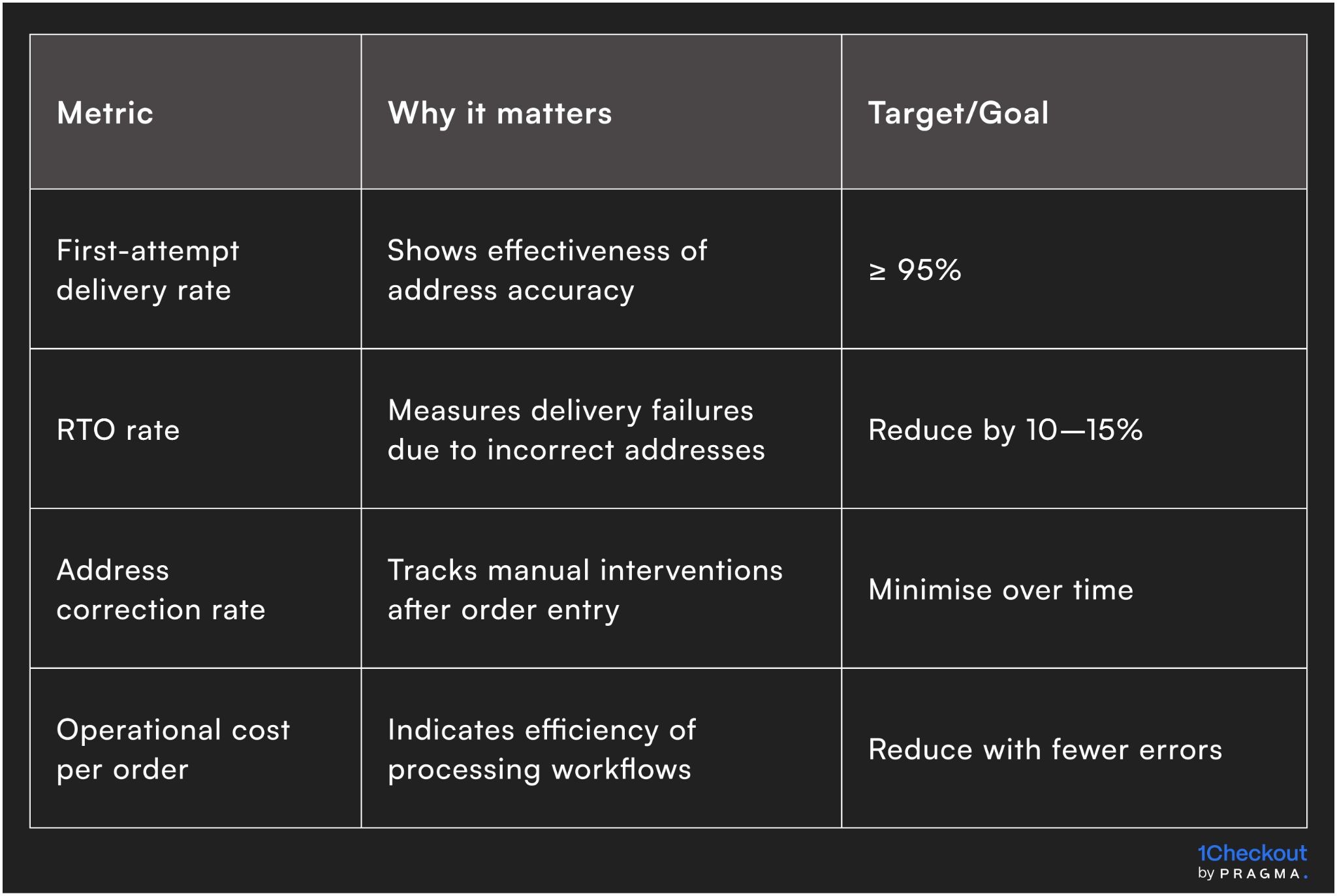
Monitoring these metrics ensures address capture methods drive real operational benefits, not just cleaner
To Wrap It Up
Address autocompletion and manual entry are complementary tools for capturing accurate delivery information. Using the right method for the right region and channel reduces errors, improves first-attempt delivery success, and lowers operational costs.
This week, audit your address capture flows and define clear rules for when autocompletion or manual entry should be used.
Over the long term, continuously refine validations, fallback rules, and staff training to maintain accuracy across all regions and channels.
For D2C brands seeking operational clarity in address capture, Pragma's address verification platform provides autocompletion, standardisation, and validation tools that help brands reduce errors, improve delivery success, and optimise operations at scale.
.gif)
FAQs (Frequently Asked Questions On Rich media vs short text: guidelines for delivery, confirmation and return messages)
1. When should autocompletion be preferred?
Autocompletion is ideal for urban and semi-urban areas with reliable mapping coverage and smartphone users.
2. When is manual entry necessary?
Manual entry is required in rural or unmapped areas, or when addresses do not match database suggestions.
3. How can we balance both methods effectively?
Use autocompletion as the default and allow manual input only for exceptions, with validation rules to maintain standardisation.
4. How often should address capture rules be reviewed?
Quarterly, or whenever new regions, carriers, or channels are added.
5. Does combining methods increase operational complexity?
It can, if standardisation and fallback rules are not enforced. Proper training and validation mitigate the risk.



.svg)
.svg)